
- EDOF is the professional interface of Mon Compte Formation, managed by the Caisse des Dépôts. Training providers publish their training courses there and track every file.
- Access requires an active NDA and Qualiopi certification for each type of action. The courses offered must also appear on the legal CPF list.
- Applying for EDOF access follows four steps: an authorized identification account, the listing application form, additional documents, then a notified decision.
- Each file follows deadlines set by the terms of use. The provider replies within 2 working days and declares both the start and the end of the training within 3 working days.
- Payment arrives within 30 calendar days after the completed training is validated. Breaches can lead to refusal of payment or delisting.
EDOF stands for the Espace des organismes de formation (training providers’ area), the professional interface of Mon Compte Formation. Providers use it to publish their CPF-eligible training courses and process registrations. Access requires, among other things, an activity declaration number (NDA) and Qualiopi certification. How does EDOF work, and what rules govern its use in 2026?
EDOF, the link between the training provider and the CPF
The personal training account (CPF) relies on Mon Compte Formation, a public platform launched on November 21, 2019. Providers had been entering their courses on it since September 2019. The Caisse des Dépôts (CDC) has managed the scheme since 2014.
Mon Compte Formation has one public side and two professional sides, including EDOF. On the public side, at moncompteformation.gouv.fr, account holders search for a course, register and confirm their order. On the professional side, management goes through EDOF: courses, files, declarations and invoicing. At the end of October 2026, the providers’ portal listed more than 14,000 registered training providers.
| Stakeholder | Role in the CPF training process |
|---|---|
| Training provider | Publishes its course listings in EDOF, responds to registrations, declares the start, end and completion |
| Mon Compte Formation | Public showcase: search, registration request and order by the account holder |
| Account holder | Uses their rights, pays their mandatory contribution, confirms the order |
| CDC | Manages the scheme, reviews listing applications, contributes to quality control and pays the provider |
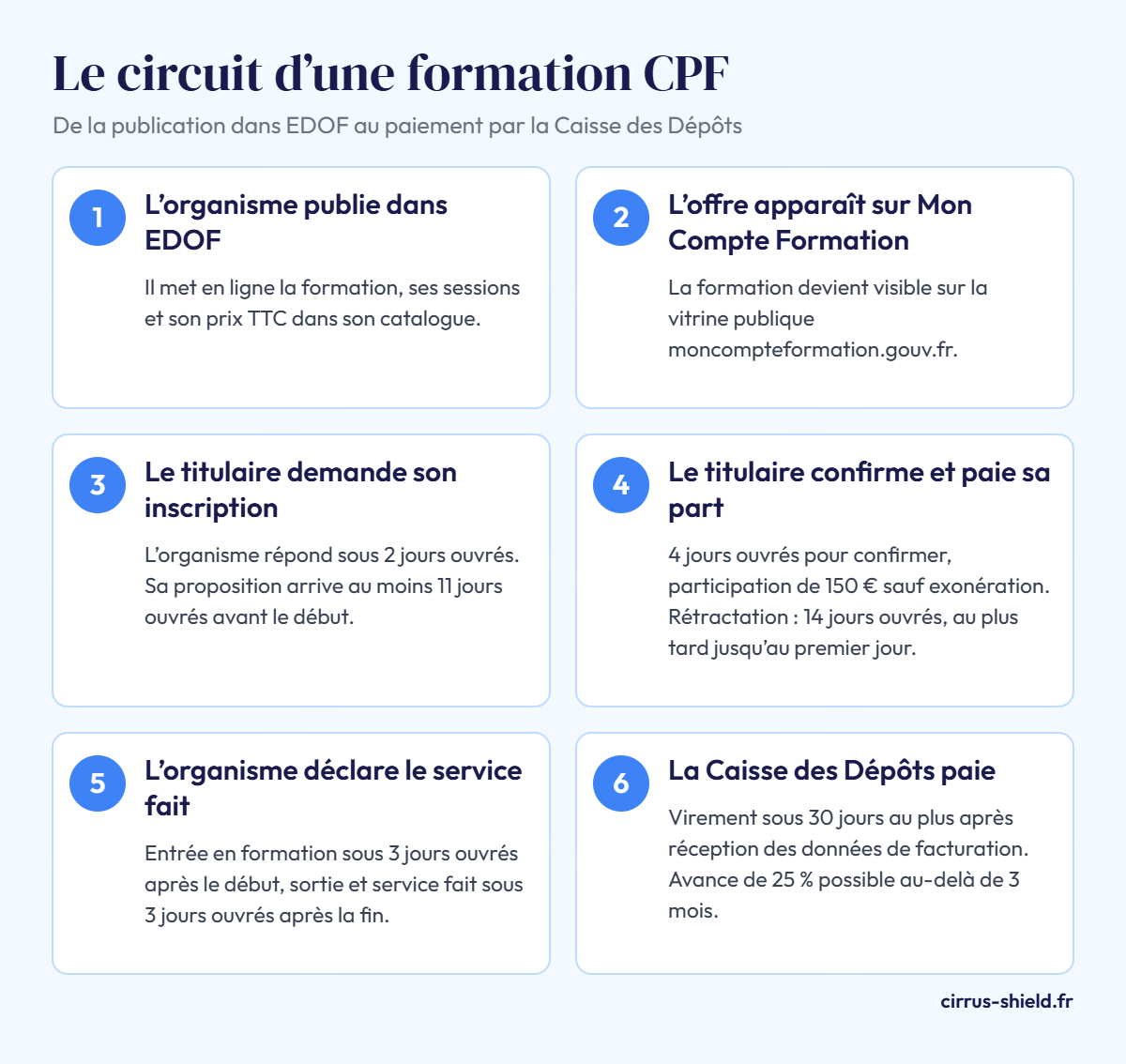
The general terms of use (CGU) act as the contract for any training purchased through the platform. They then replace the usual training agreement or contract.
EDOF only covers purchases made on Mon Compte Formation, under the CPF or the elected representatives’ account. Training funded outside the platform, by a company, an OPCO or the trainee, is tracked elsewhere. On the tooling side, Cirrus Shield offers a registration tracking CRM for training providers. It covers session management, registration confirmations, attendance sheets and invoices.
Who can access EDOF? The listing requirements
Listing depends on cumulative conditions set by law (article L6323-9-1) and repeated in the terms of use. The CDC checks them during the review, then throughout the listing period.
NDA and Qualiopi
First prerequisite: an active NDA, obtained online on Mon Activité Formation from the DREETS. Second prerequisite: Qualiopi, the quality certification required for each type of action listed. Offering skills assessments therefore requires a certificate covering that category. The quality audit process is detailed in the article on the steps to obtain Qualiopi certification.
CPF-eligible training courses
The law (article L6323-6) sets the list of fundable programs:
- training leading to a diploma, title or CQP registered in the RNCP, in full or by skills blocks;
- certifications and authorizations registered in the RS, the register kept by France compétences alongside the RNCP;
- support for VAE (accreditation of prior experience), after listing on France VAE;
- skills assessments, lasting 13 to 24 hours;
- driving licence preparation, with a prefectoral approval.
For both registers, the provider must also be authorized by the certifying body. For the light-vehicle licence, this funding is reserved for jobseekers or for training co-funded by a third party.
Up-to-date obligations and supporting documents
The provider must be up to date with its legal, tax and social obligations. The annual training and financial report (BPF) is one of them, as is bookkeeping. An article details the annual training and financial report and other yearly obligations.
The application includes a Kbis or RNE extract less than 3 months old. An association provides its articles, the minutes of its last general meeting and its JOAFE receipt. The legal representative’s ID and their signed declaration of no criminal conviction and of parentage are also required.
How to access EDOF, step by step
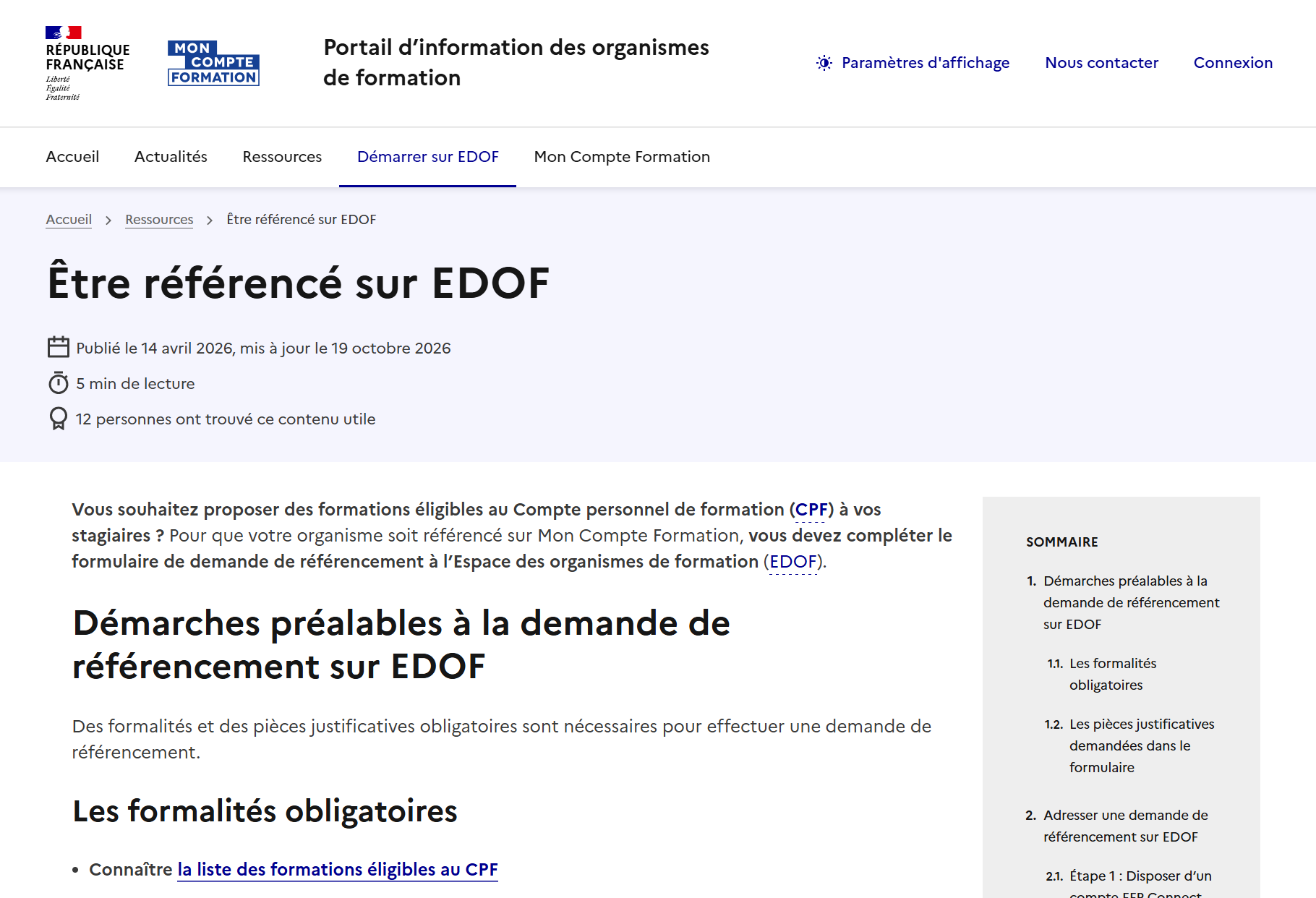
The “Être référencé sur EDOF” (Getting listed on EDOF) page, updated on October 19, 2026, describes four steps.
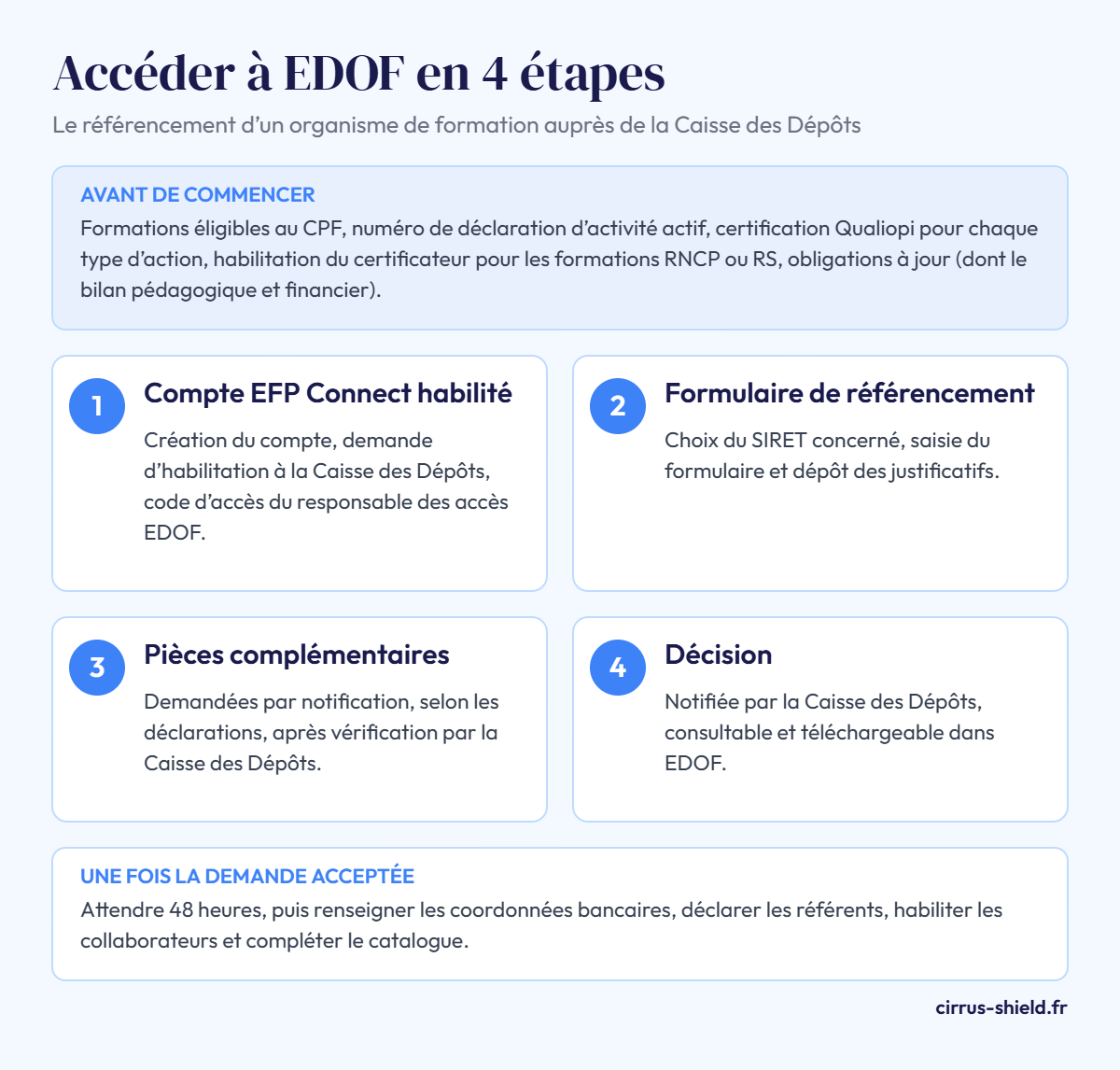
Step 1: an authorized EFP Connect account
This identification system from the ministry gives access to its online procedures. The provider creates its account, then requests EDOF authorization by email to the CDC. Documents are sent via France Transfert. The CDC then sends an access code that designates the “EDOF Access Manager”, who can then authorize other staff members.
Steps 2 to 4: form, additional documents and decision
Once logged in, the provider selects its SIRET and fills in the listing application form. An acknowledgment of receipt follows the submission. Under the specific terms, an email states within 11 working days whether the application is admissible. It must be legible, complete and truthful.
After an initial check, the procedure continues with an in-depth review. The CDC verifies the information and may request additional documents. The decision is notified and can be downloaded in EDOF. After a refusal, a new application must provide new information. Otherwise, the first rejection is confirmed.
After acceptance: bank details, contacts and access
The CDC advises waiting 48 hours before publishing courses. The provider then enters its bank details: without them, no payment is possible. It also declares its contacts and keeps this information up to date. The terms of use distinguish the legal representative and three managers: educational (catalog), administrative (files) and financial (payments).
Five roles divide the tasks: EDOF manager, catalog manager, administrative, financial and read-only. Since September 3, 2026, logging in requires two-factor authentication. After the password, a one-time code is sent by email, valid for 30 minutes. Personalized support remains available on the platform after login, for any question about a file.
What is managed in EDOF: courses, files and payment
Once the provider is accepted, day-to-day management covers three areas, each linked to an authorization role.
Course listings and sessions
Each listing shows a price in euros including all taxes and administrative fees. This price can never depend on the account holder’s rights; the terms of use consider that a misleading commercial practice. Sessions are managed by manual entry or by importing an XML file. Since October 22, 2026, courses targeting professional certifications divided into blocks must specify the blocks covered. Without this data, they are no longer visible on Mon Compte Formation.
Managing the training file, from registration to completion
In practice, each registration opens a file shared with the trainee. The terms of use set a deadline for each step:
| File step | Provider action | Deadline |
|---|---|---|
| Registration request | Reply to the account holder | 2 working days (30 working days if prerequisites must be checked) |
| Order proposal | Send the initial or customized proposal | At least 11 working days before the first day |
| Confirmation by the account holder | Wait for the order to be confirmed | 4 working days for the account holder |
| Withdrawal | Acknowledge the notified cancellation | 14 working days after confirmation, at the latest until the first day |
| Trainee start | Declare the actual start | 3 working days after the start |
| Completion and service rendered | Declare the end, its reason and the completion rate | 3 working days after the end |
| Audit | Send the requested supporting documents | 5 working days, for 5 years |
Before confirming their order, the account holder pays their mandatory contribution. It has been €150 since April 2, 2026, unless exempt. The provider cannot cover it. A cancellation by the trainee 7 or more working days before the start is free of charge.
Invoicing and payment by the CDC
As soon as completion is declared, EDOF generates an invoice request. The provider completes the invoicing information, then the CDC validates completion. Payment is made by bank transfer within 30 calendar days at most. For training lasting more than 3 months, a 25% advance can be paid as soon as the start is declared.
The rules of the game: terms of use, cold calling and audits
Listing commits providers to precise rules. Failing to comply exposes them to graduated measures.
Regularly revised terms of use
Version 16 of the general and specific terms has applied since October 22, 2026. It adds secure messaging and provides a watermark to protect the documents sent. The terms also set a 5-year retention period for the supporting documents of each completed action.
The ban on soliciting account holders
Article L6323-8-1 of the French Labor Code prohibits commercial solicitation of CPF account holders, including by training providers. Phone, text messaging, email and social networks are all covered, whether to collect data or to sell a course. The only exceptions are communications linked to an ongoing action and directly related to it. Rewards in exchange for a registration are also prohibited. The administrative fine reaches €75,000 for an individual and up to €375,000 for a legal entity.
Quality audits, sanctions and delisting
The CDC checks that training actions actually take place and contributes to quality control. Measures range from a formal reminder to refusal of payment or repayment of undue amounts. Temporary delisting lasts from 7 days to 12 months, after an adversarial procedure. Courses that do not meet the criteria can also be removed.
FAQ: EDOF and training providers
How do you log in to EDOF?
Login goes through an EFP Connect account authorized for the establishment’s SIRET.
How long does it take to get access to EDOF?
A first email on admissibility arrives within 11 working days of the acknowledgment of receipt.
Why can a listing application be rejected?
An application that is illegible, incomplete or contains unverifiable data is not admissible. Without the requested documents within the set deadline, it is rejected. A missing prerequisite, such as Qualiopi or an active NDA, also blocks access to EDOF. A conviction of the director or a sanction in the previous two years can also justify a refusal.
When does the CDC pay the training provider?
Payment is made within 30 calendar days at most, after the completed training is validated. The deadline runs from full receipt of the invoicing data.
How much does the account holder pay for a course?
The account holder has paid a flat contribution of €150 since April 2, 2026. Jobseekers are exempt, as are courses topped up by the employer, use of the C2P or an AT-MP top-up. An additional out-of-pocket amount applies when the rights do not cover the price.
Sources
- Être référencé sur EDOF, portail des organismes de formation de Mon Compte Formation (Caisse des Dépôts)
- Conditions générales d’utilisation, version 16, Mon Compte Formation (Caisse des Dépôts)
- Conditions particulières des organismes de formation, version 16, Mon Compte Formation (Caisse des Dépôts)
- Conditions particulières des titulaires, version 16, Mon Compte Formation (Caisse des Dépôts)
- Quelles sont les formations éligibles au compte personnel de formation ?, Mon Compte Formation (Caisse des Dépôts)
- Sécurisez vos accès à la plateforme EDOF, Mon Compte Formation (Caisse des Dépôts)
- CPF : la participation forfaitaire obligatoire augmente, Service-Public.fr
- Article L6323-8-1 du Code du travail, Code du travail numérique (ministère du Travail)

